v1.13.0 ·
Secure patient messaging, PDF reports, and order co-signing
Message patients securely, generate shareable PDF reports, and review individual charts across a patient cohort. This release also adds order co-signing, updates encounter workflows, and improves long scribe recordings.
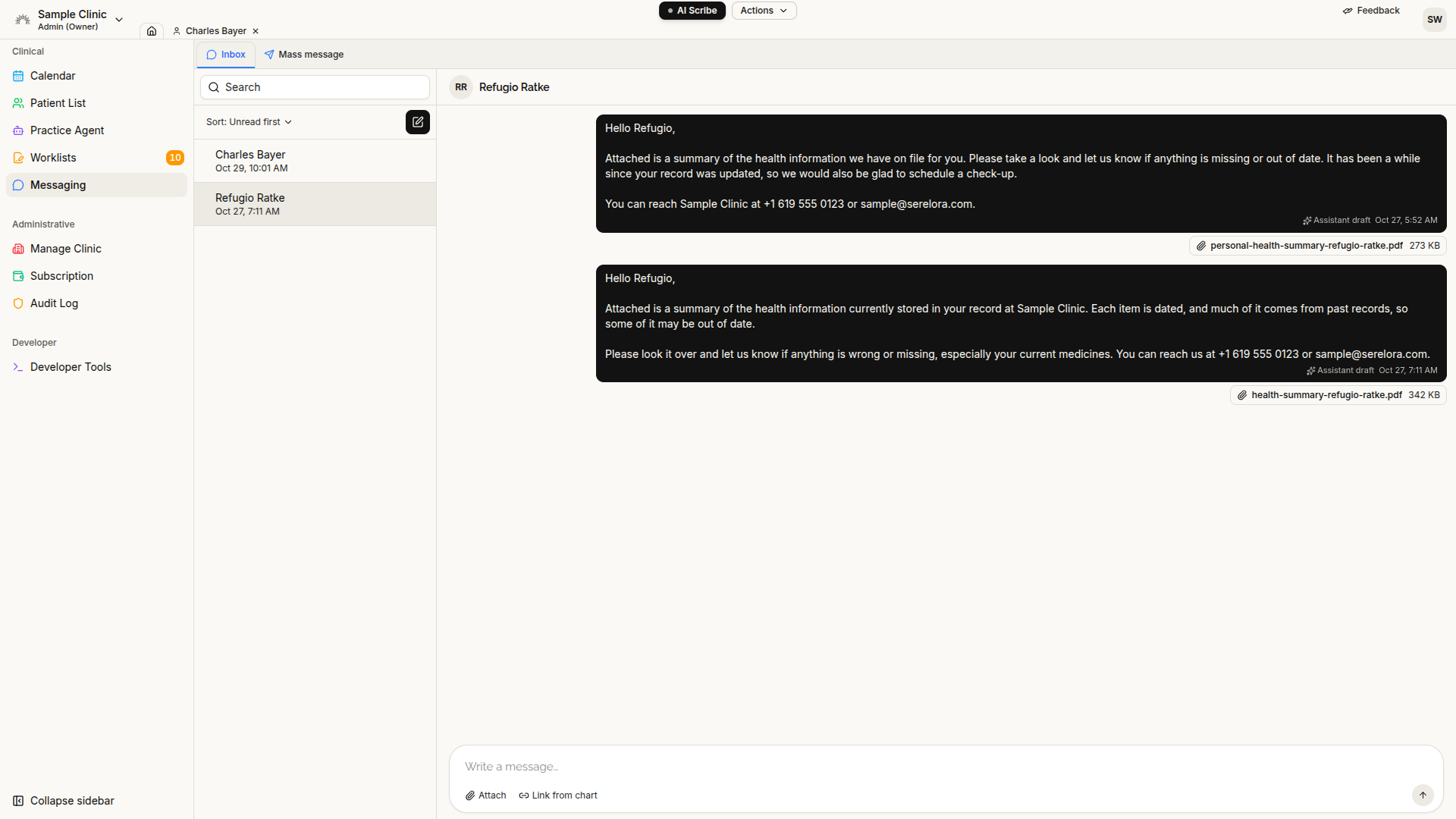
Start secure conversations with patients
You can now start a secure conversation with a patient from Messaging or the chart sidebar. Patients can reply through the patient portal or patient app.
The new Inbox includes search, sorting, and a New conversation action. The chart sidebar highlights unread patient messages so you can see when a conversation needs attention.
Messages can include attachments and links to documents already in the chart. Use Link from chart in the composer, or ask the assistant to prepare a message with a chart-document link or generated PDF report.
Sending a chart-document link makes that document visible to the patient, even if it was previously hidden in the portal. Patient-supplied attachments remain in the conversation until you select File to chart. Sent messages and attachments cannot be edited.
Patients receive email and text notifications without the message’s clinical content, subject to their communication preferences. In v1.13.0, patients without a portal account do not receive these notifications.
Generate PDF reports directly from chat
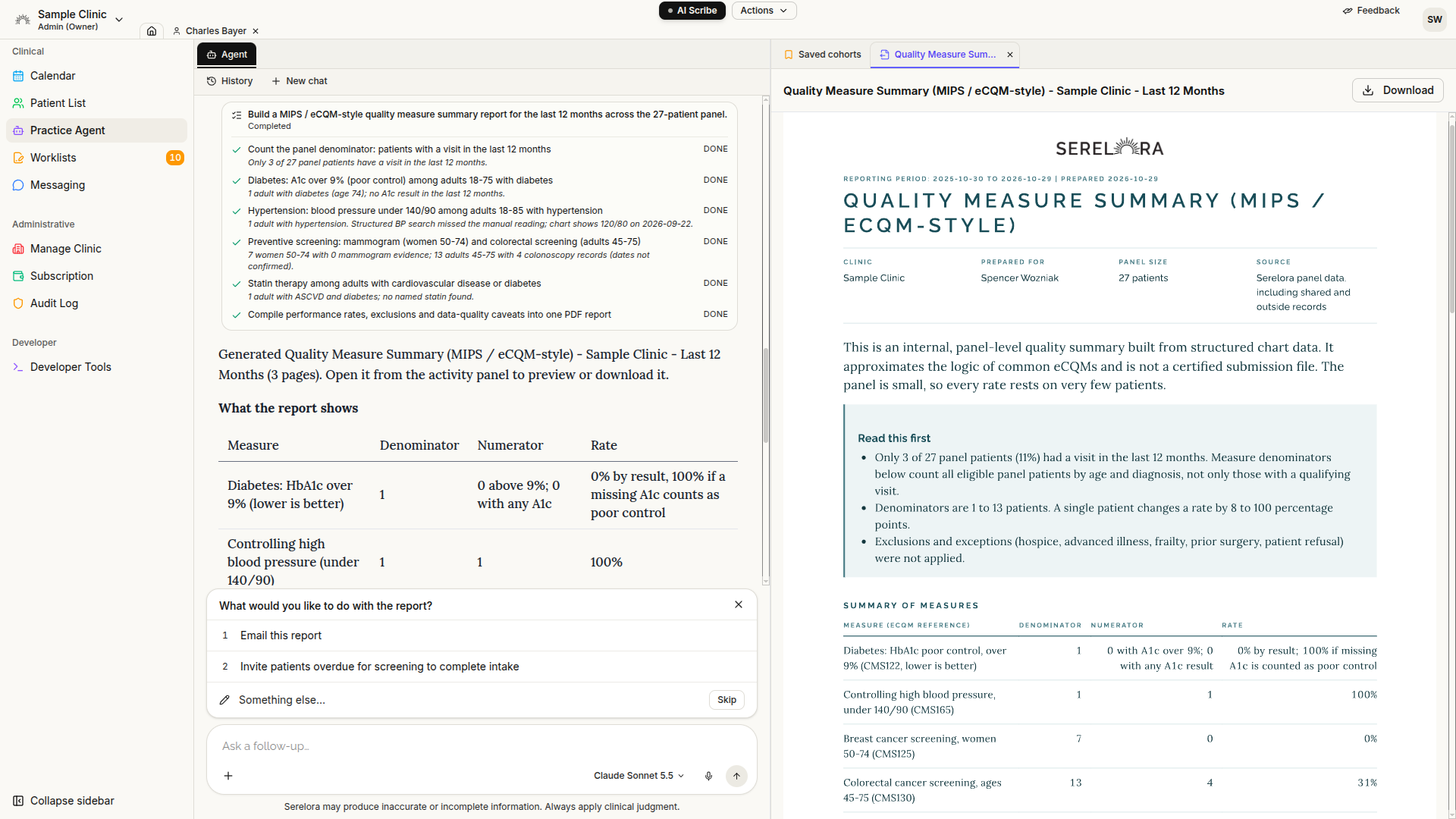
The chart assistant and Practice Agent can now create branded PDF reports that you can preview or download from the conversation.
Patient reports are not automatically saved to the chart or shared with the patient. Save a report through the provided control or explicitly ask the assistant to save it. To share it with the patient, send it through secure messaging.
Saving a report does not make it patient-visible on its own, and generated reports are not processed into new chart findings.
PDF formatting has also improved: tables now render as grids rather than raw Markdown, and a spacing fix prevents text from overlapping literature citations in signed-note PDFs.
Review individual charts across a cohort with the Practice Agent
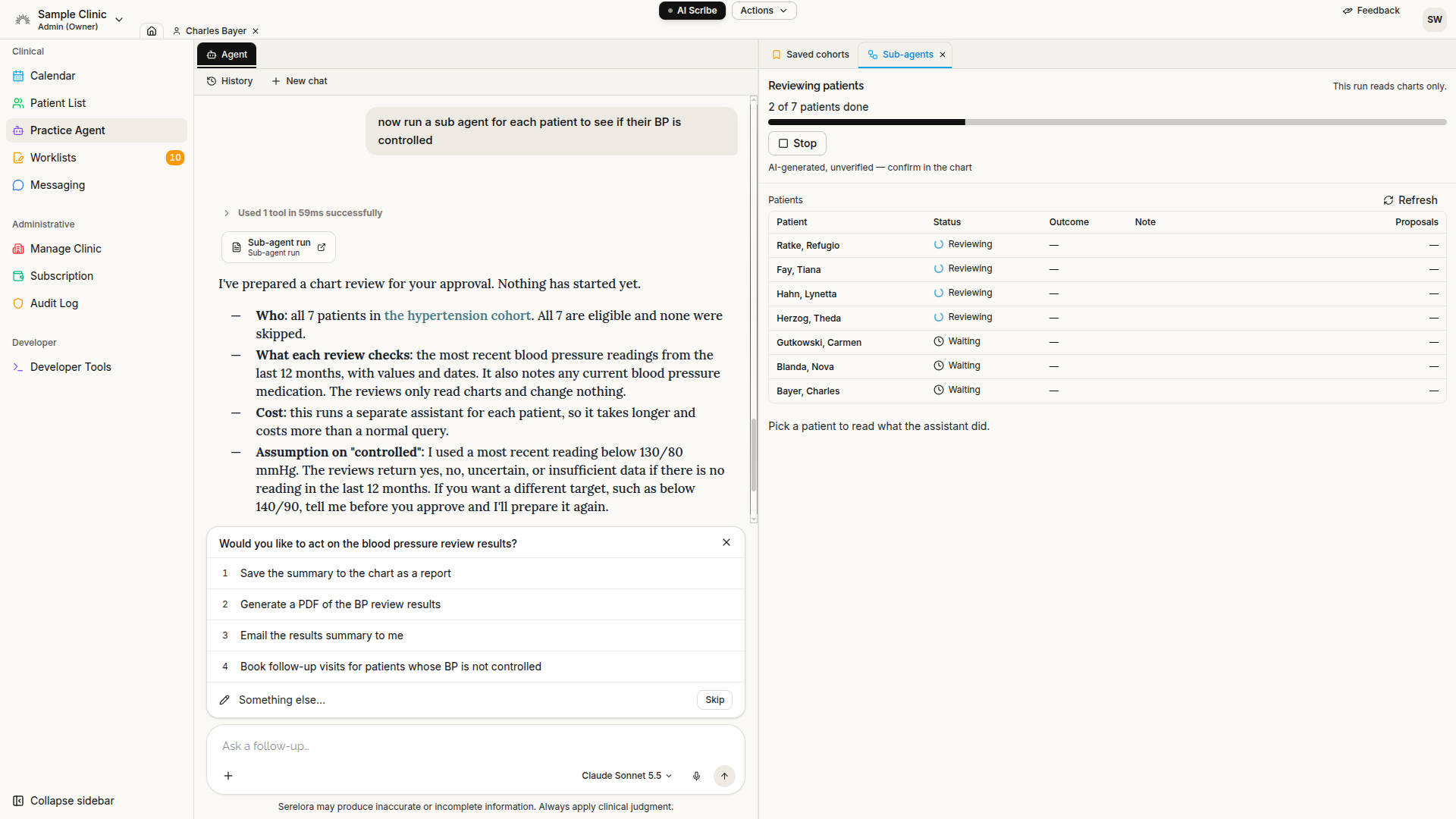
The Population Agent is now called the Practice Agent. Its existing cohort workflows remain, and patient names in answers now support hover previews.
When cohort chart review is enabled, you can approve a background review that runs separately for each included patient. Results appear in a Sub-agents tab, with a transcript available for each review.
Reviews are read-only by default. In proposal mode, the assistant can suggest supported actions such as patient-detail updates, clinical-status changes, orders, or appointments. Each proposed action still requires its own approval—approving the overall review does not authorize changes across the panel.
This workflow does not draft or edit clinical notes, perform billing actions, or run web and literature searches.
Rollout note: Cohort chart review is off by default, and end-to-end validation was still outstanding at the time of this release.
Track walk-ins and close visits when signing
Walk-in encounters now appear on the calendar, making patients already being seen visible alongside scheduled appointments.
For clinicians with permission to close encounters, the note-signing dialog now includes a default-selected “Close this visit when I sign” option. Signing with that option selected closes the linked encounter and marks its appointment fulfilled. Clear the option when the visit should remain open.
Saving a draft without an open visit now prompts you to start one. The note saves first, and a visit is never created without your confirmation.
The Sign Notes worklist also includes open encounters with their age, including visits that do not yet have a note.
Important for existing clinics: Check-in, walk-ins, visit details, the Encounters tab, and Submit for Review now require Encounters to be enabled. Clinics that previously used these controls may need the setting enabled to restore access.
Submit PA orders for co-signature
Physician assistants can now submit proposed orders for co-signature instead of encountering a permission error with no review path.
Authorized signers can open Worklists → Orders to Co-sign, review a proposal, and either co-sign it or return it with a reason. The PA can revise the proposal’s note and priority, then resubmit.
An order proposal is not transmitted before co-signature. This release adds the review workflow within Serelora; it does not introduce a new live pharmacy or laboratory delivery connection.
Note co-signature has also been strengthened. A signer must review a draft that changed after they opened it, and edits by the signer preserve the original drafter’s authorship credit.
Navigate a full-width, tabbed workspace
A new full-width header keeps the clinic picker, toolbar, and Feedback accessible across the platform, including patient charts. Your account menu is now in the avatar at the far right.
The assistant chat and workspace remain open as separate panes, each with a tab row.
Several administrative areas have moved: Billing Settings, Orders, and Consent Forms are now tabs within Manage Clinic. Worklists brings review queues together, including Orders to Co-sign.
More reliable long recordings and mobile scribe notifications
This release fixes a failure that could lose a long web scribe recording at the end of a visit and temporarily interrupt platform access.
Web recordings now upload in smaller parts while recording, rather than sending the entire file after you stop.
The provider mobile app also gains native push notifications for scribe processing, completion, and failure. Notifications do not include patient information; open the app to see the details. Repeated processing updates no longer generate duplicate alerts for the same status.
Record paper or verbal consent decisions
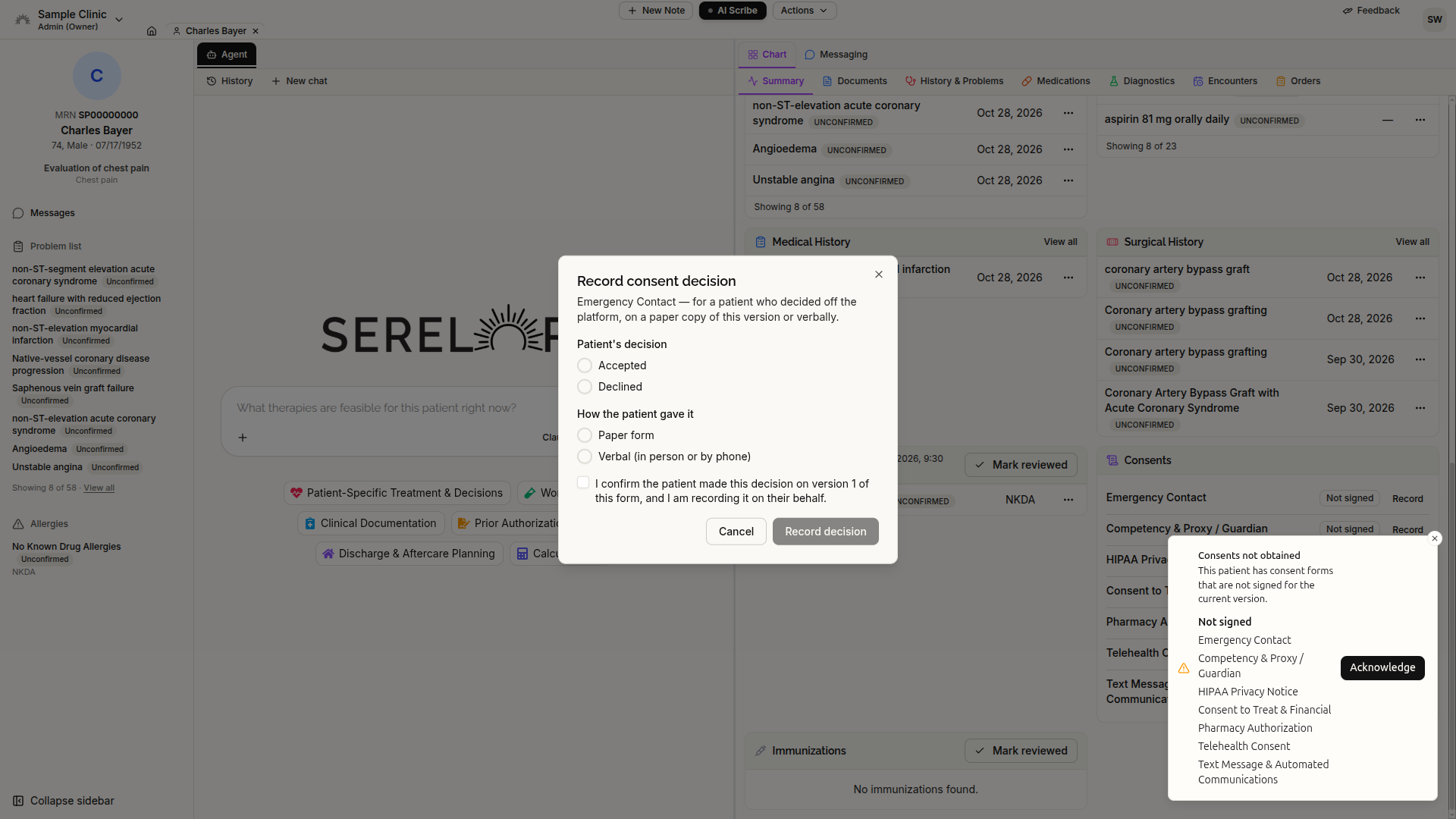
When enabled for your clinic, authorized staff can record a patient’s acceptance or decline of a paper or verbal consentfromSummary → Consents.
Select Record beside the applicable form to document the decision. This is separate from managing or replacing the clinic’s consent forms.
Import a roster with your own column layout
The Import page now includes Raw Spreadsheet as a third roster source.
Upload a CSV or .xls file, match its columns to patient-record fields, and review the preview before confirming. The import then runs in the background.
This provides an option for roster exports that do not match the existing Office Ally or NextGen Office formats.
A read-only NextGen Office connection
Actions → EHR Pull adds a pathway for bringing one patient’s structured records, clinical notes, and clinical summaries from NextGen Office into Serelora.
The connection is read-only and requires clinic enablement and a configured EHR connection. It does not send changes back to NextGen Office.
Live NextGen Office connectivity had not yet been verified for v1.13.0. Clinics should not rely on this connection until its configuration and availability have been confirmed.
Clearer text-message and campaign review
The chart assistant can now prepare a text message to the open patient’s recorded phone number. You review and confirm the message before it is sent.
Bulk messaging now uses a four-step flow: Send by, Recipients, Message type, and Message. The final review shows the rendered email or text, so you see what patients will receive before confirming the campaign.
More precise chart entries and note editing
- Search terminology before adding a condition or medication: These dialogs now begin with a code search. Free-text entry remains available when no match is found. Manual coding no longer requires separate clinic enablement, although staff permissions still apply.
- Record only the onset precision you know: Onset dates can now contain a year alone or a month and year, without implying an exact day.
- Keep erroneous findings out of the default view: Entered-in-error findings are hidden by default in History & Problems, with a toggle to show them. The assistant also excludes entered-in-error and refuted findings by default.
- Preserve note drafts: Drafts autosave and remain available when you leave the tab. Signed notes now support highlighted source mentions, and the editor allows scrolling beyond the end of the note.
- Keep literature citations in the clinical assessment: Assistant-written notes and addenda place literature citations in Assessment and Plan, rather than throughout the note.
Distinguish missing risk data from a zero score
Risk calculations no longer return 0.0 when required inputs are missing.
A numeric score appears only when the requested calculation succeeds. Insufficient data, invalid inputs, inapplicable calculations, unavailable calculators, and failed calculations are identified without presenting them as zero risk.
Calculations now use one specifically identified calculator rather than automatically combining results from multiple calculators.
Additional fixes and administrative updates
The calendar remembers the provider selection and view you last used. Chat has a taller input with an expand control, and citations display as complete links rather than briefly appearing as raw formatting.
Record-editor, triage-note, and staff-permission saves now reject outdated changes rather than overwriting newer information. Repeated intake-link sends also no longer invalidate a link already delivered to the patient.
Clinic administrators can update the organization’s Type 2 NPI. New or changed passwords must contain 14–128 characters and pass a common-password check; existing passwords continue to work.
Document-processing update: Default clinical document extraction may now run across AWS commercial regions. Clinics with region-specific processing requirements should confirm their configuration with Serelora.