v1.14.0 ·
Two-way texting, recording safeguards, and chart-editing improvements
Send and receive texts in patient conversations, use stronger safeguards for scribe recordings, and update chart findings with notes and structured family relationships. This release also fixes patient access to secure messages.
Send and receive texts in patient conversations
A new Secure message | Text message selector appears above the composer in the Messaging Inbox and the chart’s Messaging tab.
Choose Text message to send the message’s actual content to the patient’s phone—not just a notification to open the portal. Patients can reply by text, with matched replies appearing in the conversation.
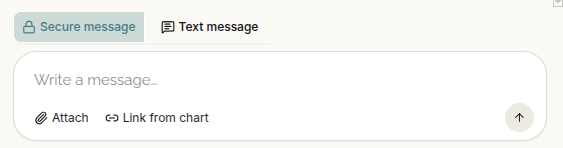
Texts are text-only, with a 1,600-character limit, and follow the patient’s text-message consent and opt-out settings. A Text label distinguishes them from secure messages in the platform, patient portal, and patient app.
Delivery updates show whether a text was sent, delivered, or undelivered. A rejected text remains visible with the reason it could not be sent.
Texts use a shared toll-free number. Replies are matched to the originating text when possible; otherwise, they go to the most recent conversation that texted that number within the previous 30 days. Unmatched incoming texts do not start new conversations.
Keep assistant-sent texts in the conversation
Texts sent by the chart assistant now appear in your Messaging conversation with that patient, making them easier to review alongside other exchanges.
Automated appointment reminders, intake invitations, campaign texts, and secure-message notifications are not yet included in these conversation threads.
You can also edit the assistant’s secure-message draft before sending, directly in the review dialog.
Fixes for patient registration and message access
This release addresses the two patient-access problems identified in v1.13.1:
- Registration links: Fixed a problem that caused some patients with older invitations to receive a sign-up link that immediately displayed “Invalid or expired link.”
- Opening unread messages: Patients with an unread message now reach their conversation rather than being redirected to finish onboarding first.
Patients can read and reply to an available conversation before completing the rest of onboarding. The patient chat page also shows an unread-message notice at the top, and conversations and composing controls have been adjusted to provide more room on phone screens.
Stronger safeguards for scribe recordings
Recording controls now make it harder to accidentally discard a visit recording.
While recording, Minimize collapses the recorder into a small, movable bar so you can continue working. The close control is removed during recording; use Stop to finish.
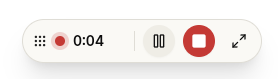
A prompt warns before reloading or closing the browser tab. Signing out saves rather than discards the recording, and sign-out is blocked while another browser tab is recording. Losing microphone access also triggers an alert.
Once the recording upload is complete, note processing and creation can finish without a browser tab remaining open. A temporary account-status check failure is also no longer treated as a sign-out that reloads every open tab.
Add context and correct chart findings
When enabled for your clinic, an individual chart finding now has an editable notes field in its detail panel.
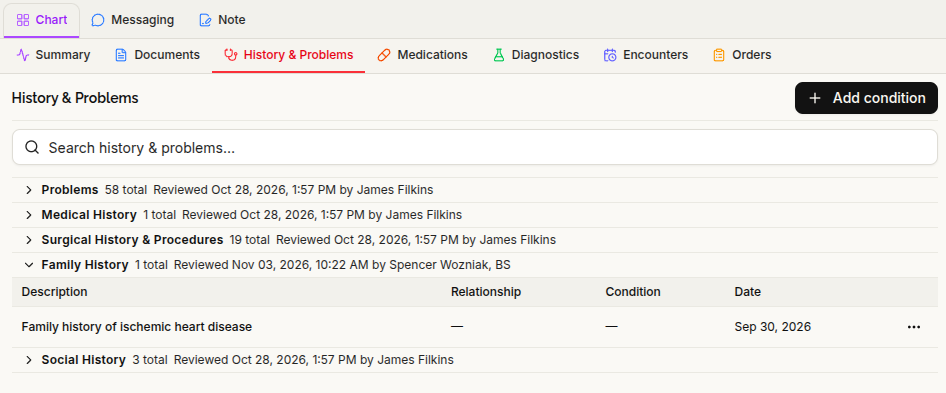
Family-history entries also gain a structured family relationship, which can be edited from the row’s Edit dialog or the detail panel. This lets you identify which relative the recorded history concerns.
Finding names can now be edited from both the detail panel and table Edit dialogs. Findings marked Entered in error are also hidden from the sidebar’s Problem List, consistent with the default History & Problems view.
Search condition codes more flexibly
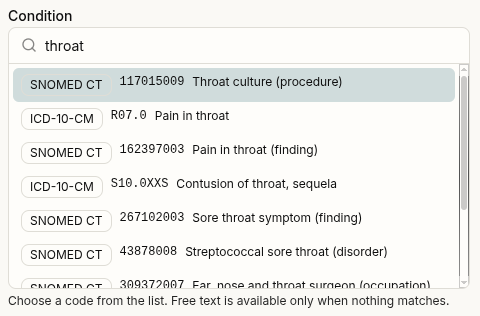
When expanded code search is enabled, terminology searches match all the words in your query regardless of their order.
Add condition searches ICD-10-CM first, with a vocabulary control to include SNOMED CT.
Import large FHIR records with fewer interruptions
Fixed failures that could interrupt large FHIR imports into a new, empty patient chart.
During that initial import, entries are kept separate rather than merged as they arrive. Duplicate findings can then be reviewed and reconciled in Manage Claims.
An import that failed before this update may need to be run again.
Better recovery during platform updates
Document extraction now has recovery measures for service restarts, reducing the chance that a signed note’s chart extraction remains stuck after an update.
Older browser tabs can also recover from update-related loading problems with a controlled reload rather than remaining on a broken page. Additional changes are designed to reduce interrupted requests and assistant responses during maintenance.
Other improvements
- Account activation: You can resend an activation email from the sign-in page. Setting a password through an account link also ends previously active sessions.
- Signed notes: Signed-note typography now matches the note editor.
- Staff selection: Manage Staff and provider selectors load correctly even when a member has not yet supplied a legal name.
- Guided tutorial: The clinic’s test patient remains available after the tutorial, and a new “what’s next” dialog helps you continue.