v1.15.0 ·
PDF form filling, expanded mobile apps, and richer chart imports
Complete PDF forms from chart chat, choose which attachments become part of the patient record, and use expanded assistant and messaging workflows on mobile. This release also improves visit documentation, imports, and clinical data accuracy.
Fill, review, and sign PDF forms from chat
Use Add documents in chart chat to attach a blank PDF form. The assistant can identify its fields and fill the original PDF, including forms without interactive fields.
Review the rendered form and correct individual fields before selecting Sign and Send. This applies your typed electronic signature to the version you reviewed and emails it.
The assistant never signs on your behalf. Only the provider who created the form can sign it, and their account must have order-signing permission. Forms requiring a signature cannot be emailed, shared through messaging, or saved to the chart while unsigned.
For clinics using Skills, reusable procedures can now include blank forms and a human-entered email destination. The assistant does not choose the destination.
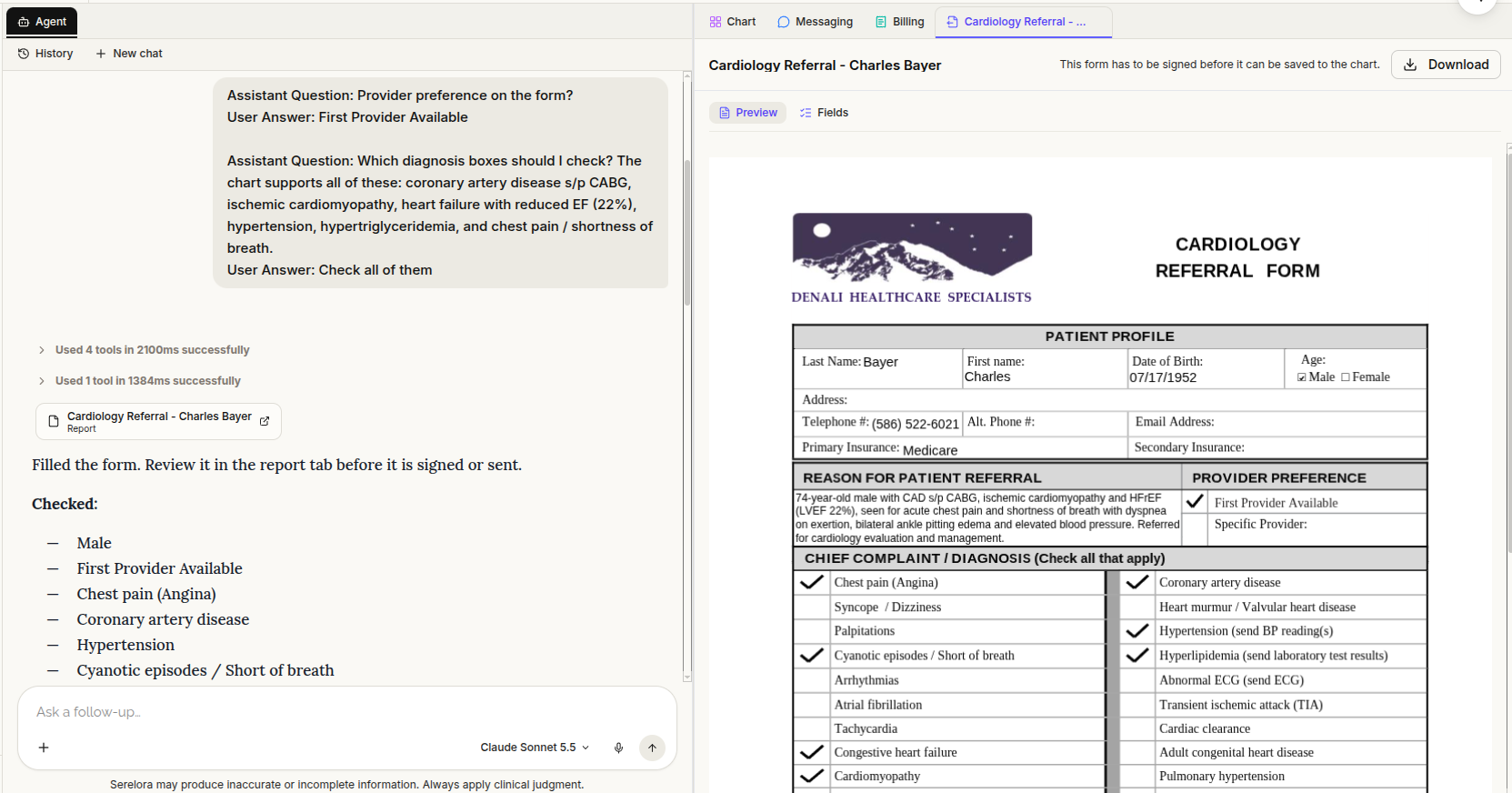
Chat attachments stay separate from the patient chart
Files added through Add documents in chart chat are now chat-only. They no longer automatically appear as documents in the patient record.
The assistant can use an attachment in the conversation. When it belongs in the clinical record, explicitly ask the assistant to file it to the chart.
This distinction lets you work with blank forms and reference files without automatically adding them to the patient’s permanent record.
Expanded provider and patient mobile apps
The updated provider app is organized around Agent, Scribe, and Messages.
The Agent tab brings the chart assistant and Practice Agent to the same conversations you use on the web, with streamed responses, activity updates, and plan approval. Review cards not yet supported on mobile provide Continue on web.
The Messages tab includes the secure inbox, attachments, File to chart, and an unread-message badge. Providers working across multiple clinics also have a clinic picker on the home screen.
The patient app, now named Serelora Patient, uses Chat, Messaging, and More tabs. Patients can use the AI Advocate with streamed responses, return to previous conversations, respond to question and booking cards, and exchange secure messages.
These changes require updated mobile apps.
Keep the current visit in view
The patient sidebar now focuses on the current visit, with a Start visit action.
Problems and allergies have been removed from the sidebar and collapsed navigation rail. They remain available in the Summary widgets and relevant chart sections, including History & Problems.
Visit documentation also distinguishes Visit type from Reason for visit, alongside the existing triage note.
Route note review to the attending clinician
The Mine view in the notes worklist now includes drafts filed under visits you attend, even when another team member drafted the note.
Submit for Review requires the note to be linked to a visit. Review notifications go to that visit’s attending clinician.
This release also fixes a bug that could lose a scribe-generated note when saving its draft failed. The completed scribe result remains available until the draft has been saved successfully.
Preserve more information from imported records
New C-CDA clinical-summary imports preserve the source’s section titles, narrative, and more structured clinical details.
When the Sections view is enabled for your clinic, you can review those source sections in the document viewer. A separate correction improves how chief-complaint, reason-for-visit, and discharge-medication sections are classified during import.
FHIR uploads now accept .fhir files wherever FHIR JSON is supported. Bulk imports and individual patient uploads also handle demographic and insurance information more consistently.
For an existing patient, each type of demographic or insurance information is added only when the chart has none of that type, rather than replacing existing information.
More faithful dates, clinical status, and missing information
Several extraction changes improve how source information is represented:
- Dates retain their stated precision. A year or month-and-year is preserved without inventing an exact day. Imported FHIR allergies use their recorded onset information rather than the date the record was received.
- “Not given” stays distinct from “inactive.” C-CDA medications and immunizations marked as not given retain that meaning. Resolved or inactive FHIR conditions remain recorded conditions with a clinical status, rather than being treated as negated findings.
- Missing information is not treated as a negative finding. The assistant is informed when a finding’s date was not stated and is instructed not to interpret absent documentation as evidence that a condition or event did not occur.
An optional patient data-gap summary can also be enabled for the assistant. Large-document processing has been improved to address failures or empty extraction results caused by cut-off responses.
More chart tools available through staff permissions
Several capabilities no longer require separate clinic activation: clinical code search, notes on individual findings, Manage Claims, patient merging, and staff-recorded consents.
Their existing staff permissions still apply. Removing the separate clinic switch does not give every user permission to perform every action.
Integration setup and verified Google Workspace domain joining also no longer require their former individual clinic switches, although connection configuration is still required.
Secure messaging settings have moved
Secure messaging and two-way texting are now managed within Patient messaging.
Clinics that previously used secure messaging may need it re-enabled after this update. The same applies to two-way texting. Contact Serelora if these controls are missing after the update.
Connect personal external tools
When MCP connections are enabled, eligible users can manage their own external tool connections from Tools & Skills → MCP.
You can connect, test, edit, enable, or remove a personal server. Before enabling it, you must acknowledge the disclosure describing potential sharing of patient information with that service.
Personal connections are available only to their owner in chart-assistant and Practice Agent conversations. They are not used by cohort sub-agents. Connections requiring credentials depend on the required Serelora configuration being in place.
Gmail and Google Drive still require additional setup before Connect can complete. Spruce messaging is not live in this release.
Simpler provider setup and credential recording
New clinic setup now begins with optional NPI entry. When supplied, information from the CMS registry pre-fills the provider’s profile. You can still continue without an NPI.
Providers can also record state-specific DEA registrations and authorized schedules. Registration numbers are masked, providers can add their own entries, and corrections require a Serelora administrator.
This records credential information only; it does not add controlled-substance prescribing functionality.
Adding an existing user account to a clinic now requires the account holder’s consent. Registration rejections are also limited to the clinic making the decision.
Expanded Billing workspace: not yet available for live insurance billing
An expanded Billing workspace has been added for a staged rollout, with Needs you, Patients, Payments, and Payer policies pages and a permanent Billing tab in the chart.
The new billing capabilities ship disabled, and live insurance billing is not available in this release. Eligibility, prior authorization, claims, remittance, and denial workflows are not yet connected for live payer transactions.
Where billing is enabled, a fix restores the chart’s Billing tab when it previously would not open. Partial or split payment allocations and credit application are not included yet.
Other workflow fixes
Bulk clinical-status review now preserves rejected rows rather than losing those decisions. Assistant-proposed patient edits retain guarantor external identifiers, and the header’s Home button now sits beside the clinic picker.
Order-catalog lookups have also been streamlined, and the built-in orderable catalog has been completed.