v1.6.0 ·
Image uploads, expanded document search, and scheduling fixes
Upload images to patient records, find documents by keyword and date, and see clearer processing statuses, with additional updates to scheduling and patient demographics.
Upload images directly to patient records
The document upload window now accepts image files. Text recognition has also been updated for scanned documents and for onboarding images, including insurance cards, medication labels, and the back of an ID.
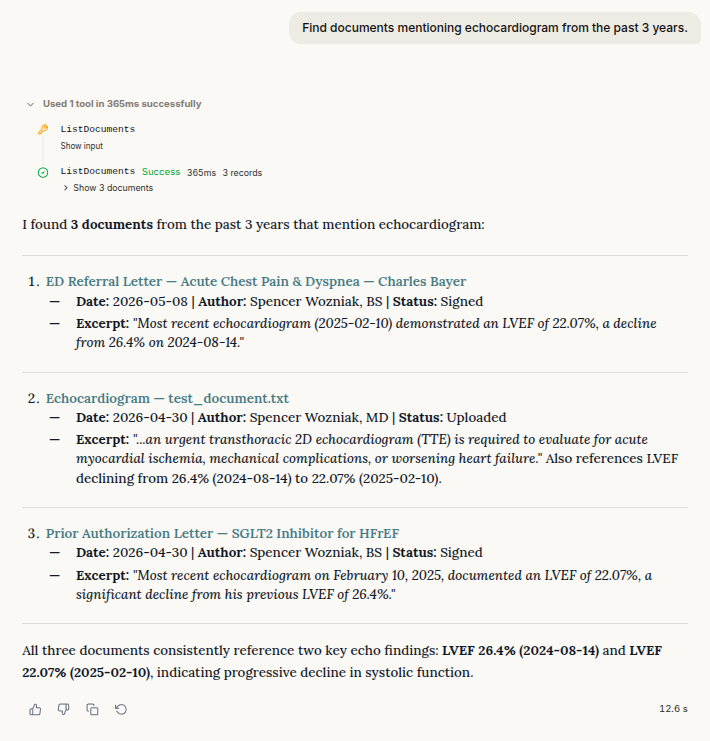
Find documents by keyword and date
The clinical agent can now search across document contents for keywords and filter results by date. This extends the search options introduced in the previous release, which focused on finding text within an individual note or document.
For example, ask: “Find documents mentioning echocardiogram from the past 3 years.”
See clearer upload statuses
Documents waiting for information extraction now appear as processing, rather than being incorrectly reported as failed uploads.
Duplicate uploads are also identified as duplicates instead of being reported as unexpected errors.
Keep scheduling aligned with clinic settings
Further scheduling fixes keep both the calendar and appointment-editing page aligned with the clinic’s timezone.
Patient self-booking now requires working hours to be configured. Make sure working hours are set before directing patients to book online.
Updates to patient records, portal access, and chat
- Expanded demographics: Patient records now support additional demographic fields.
- Patient portal records: Patients can now find all categories of recorded clinical information in the portal.
- Clinic access confirmation: The patient portal now asks for confirmation before a patient revokes clinic access.
- Recent conversations first: Sidebar chat history is now ordered by the latest message in each conversation, keeping recently active chats at the top.