Search documentation
Find a documentation page by the words on it.
Documentation
What the Chart Agent Can Read
Before the chart agent answers, it reads. It reads only the patient whose chart is open, and only what you are allowed to see. This page lists what it can look at, so you know what to ask about and what to check yourself.
What it can read
| What | How you might ask | Good to know |
|---|---|---|
| Chart entries: conditions, medications, allergies, lab results, vital signs, procedures, immunizations and other entries | "What is she taking for blood pressure?" "Show his last three A1c results." | It can narrow by type, by words in the entry, by whether the patient currently has the condition, and by whether the entry is confirmed or ruled out. |
| Documents in the chart | "Find the discharge summary." "Which document mentions the stress test?" | It searches filenames, authors and categories, and also the text inside each document, then reads the passage it needs. It can read a document that is still being processed, but then it has no extracted entries or codes for it yet. |
| Notes, drafts and signed | "Read yesterday's visit note." | A signed note is read back in full, with every addendum. |
| Visits | "Is she checked in?" "What was the chief complaint at the last visit?" | Needs the Encounters feature. It lists recent visits, 10 by default and up to 25, with status, period and visit details. Cancelled and entered-in-error visits are left out unless you ask. |
| Appointments | "Who am I seeing tomorrow?" "When did I last see this patient?" | It starts with your own appointments, 30 days back and 30 days ahead, and each one is marked past or upcoming. It looks at another provider or the whole clinic only when you ask. |
| Orders | "What orders does she have?" | Needs the Orders feature. It lists active orders, or the history if you ask. It does not return notes or dosing detail. |
| Billing | "What does she owe?" | Needs billing turned on. See Billing with the Chart Agent. |
| Files you attached to the chat | "Summarize the PDF I attached." | See Attaching Files to a Chat. |
| Open tabs | "Summarize this document." | A document or note you have open in the chart gives the agent context, so you do not have to name it. |
It always links what it found
When an answer names a chart entry or a document, the words are a link. Select it to open the source, or hover to preview. See Asking Questions About a Patient's Chart.
See the steps it took
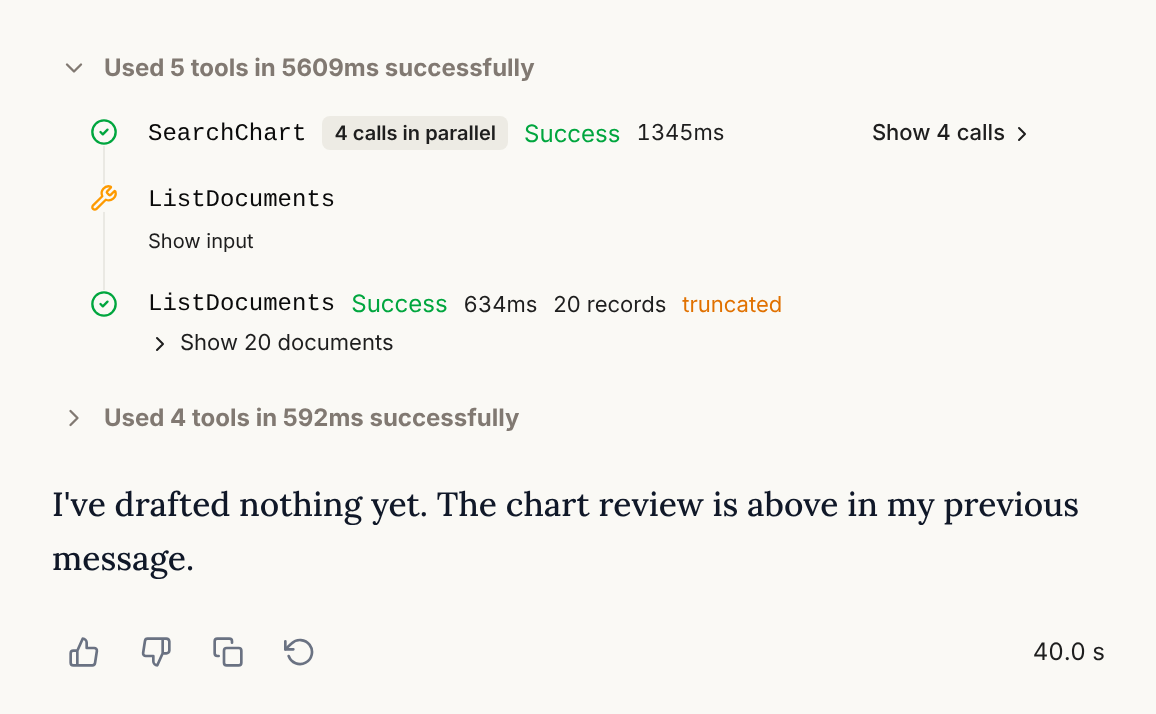
Above each answer is an activity block. Expand it to see every step in order. A step that read something shows the name of what it ran, whether it succeeded, how long it took and how many records came back. A step marked truncated had its result cut short. Select Show input to see what it asked for.
What it cannot read
- Another patient's chart. Open that chart to ask about that patient.
- A patient you have no access to, or a clinic you are not working in.
- Anything about the whole panel. For that, use the Practice Agent.
- The wider web for patient information. It can look up public medical references with the patient's details left out. See Literature Answers and Citations.
Reading needs permission to view the chart, which all six roles have by default. Visits, orders and billing also need the feature turned on for your clinic. If a feature is off, the agent simply does not offer it. See How Permissions and Feature Flags Limit the Agents.
Good to know
- Reading never changes the chart.
- If the chart does not hold what you asked about, the agent says so instead of guessing. A missing fact is unknown, not negative.
- Each read is recorded the same way as when you open the record yourself. See What Is Recorded When You Use the Agents.