Search documentation
Find a documentation page by the words on it.
Documentation
Setting Payment Terms for Invoices
Your clinic's payment terms decide the due date on every new invoice. Set them once and each invoice you issue tells the patient when payment is due, and your past due lists and age tiles count from that date.
This feature is controlled by the Billing feature flag. If you do not see it in your clinic, contact Serelora at support@serelora.com and ask for it to be turned on.
What you need
Admins and Office Managers can change the terms by default. Anyone who can read billing can see them. There is one setting for the whole clinic. It is not set per patient or per visit.
Step 1: Open Billing Settings
Select Manage Clinic in the sidebar, then the Billing Settings tab. If you do not see the tab, your clinic does not have Billing turned on, or your role cannot read billing. See Billing Pages Not Showing.
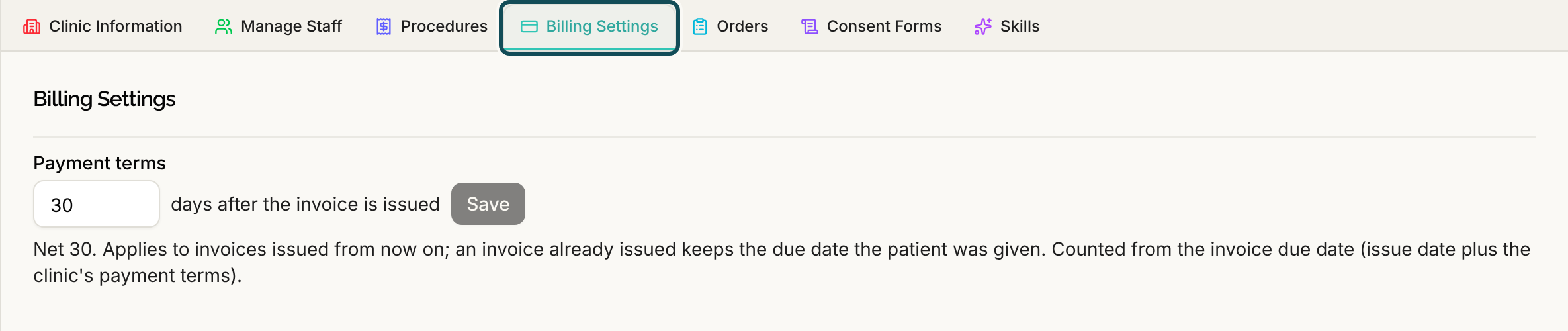
Step 2: Choose the number of days
In Payment terms, type a whole number of days from 0 to 365. The words beside the box say "days after the invoice is issued". The default is 30, shown as "Net 30". A value of 0 means the invoice is due when it is issued, shown as "Due on receipt".
Select Save. A message says "Payment terms saved". A number outside the range is refused with "Payment terms must be a whole number between 0 and 365 days."
The page repeats the rule under the box: the terms apply to invoices issued from now on, and an invoice that was already issued keeps the due date the patient was given.
Step 3: See where the due date shows up
- On the invoice. Each invoice card shows a "Due" line with the date, and "Past due" with a number of days once it is late. See Invoices.
- In the invoice list. Billing, Payments, Invoices has a due date column and a Past due chip. See Open Balances and Unpaid Invoices.
- In the age tiles. The receivables summary under Billing, Patients counts each invoice's age from its due date, which is the issue date plus your terms. The Over 30 days filter shows patients with an invoice more than 30 days past due.
What the terms do not do
- They do not change old invoices. An invoice issued before you changed the terms keeps its date.
- They do not send reminders. A due date does not trigger an email or text. See Collecting Patient Balances.
- They do not charge late fees. Serelora has no late fee setting.