Search documentation
Find a documentation page by the words on it.
Documentation
Switching Between Clinics
One Serelora account can belong to several clinics, for example if you work at two practices. You work in one clinic at a time. Patients, the schedule, staff, billing, your permissions and the agent all follow the clinic you pick.
Step 1: Open the clinic picker
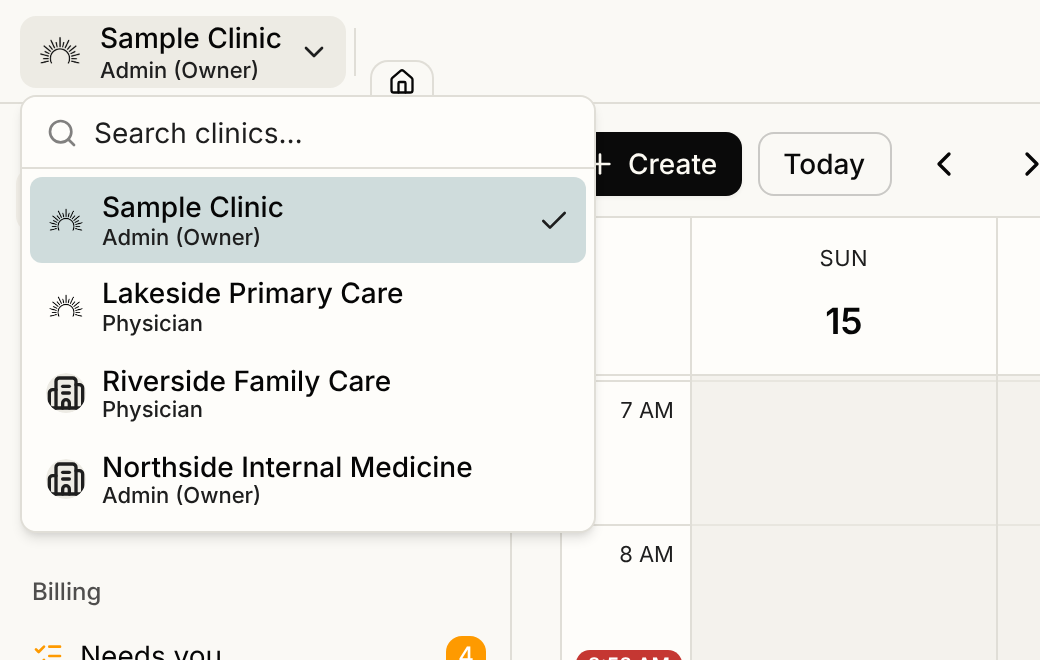
The picker is a card at the left end of the header, showing the clinic's logo and name. If your account belongs to only one clinic, the card is a plain label with no menu.
If you belong to two or more clinics, select the card. A list opens with a Search clinics… box. The clinic you are in has a check mark.
Step 2: Pick a clinic
Type to narrow the list, then select the clinic you want. Serelora reloads the page you were on in the new clinic. It does not send you back to the home screen.
Because the page reloads, open charts, workspace tabs and chat sessions from the old clinic are closed, so nothing from one clinic stays on screen under another. If you have unsaved changes in a patient record, Serelora asks before it switches.
If the page you were on does not exist in the new clinic, such as a patient chart that belongs only to the other clinic, Serelora takes you back to the home screen.
Good to know
- Your role is separate in each clinic. You can be an administrator at one clinic and a physician at another. The picker shows the access role you hold in each, under the clinic's name.
- Serelora remembers your choice. Your browser opens the last clinic you picked, and your account remembers it for other devices that have no choice of their own yet.
- Each clinic must have you as an active member. If a clinic removes you, it disappears from the picker. If you cannot find a clinic you expect, ask its administrator to check Manage Staff, or see Accepting a Clinic Invitation.
On your phone
In the Serelora Provider app, the active clinic appears on the home screen under your greeting. With more than one clinic, tap it to open a list and choose another. The switch decides which patients you can open and scribe.