Search documentation
Find a documentation page by the words on it.
Documentation
Removing Staff
When someone leaves your clinic, remove them from your clinic's staff. Removal ends their access to your clinic's patients and records. It is for your clinic only. Only people whose role can manage staff, which is the Admin role, see this action.
Step 1: Find the person
Select Manage Clinic in the sidebar, then the Manage Staff tab. Use the search box above the table if the list is long.
Step 2: Remove them
- Select the actions button (three dots) at the end of the person's row.
- Select Remove from clinic.
- Read the confirmation. It reads Remove the person's name from this clinic? and explains: They will lose access to this clinic's patients and records. Their account and any other clinic they belong to are not affected.
- Select Remove, or Cancel to keep them.
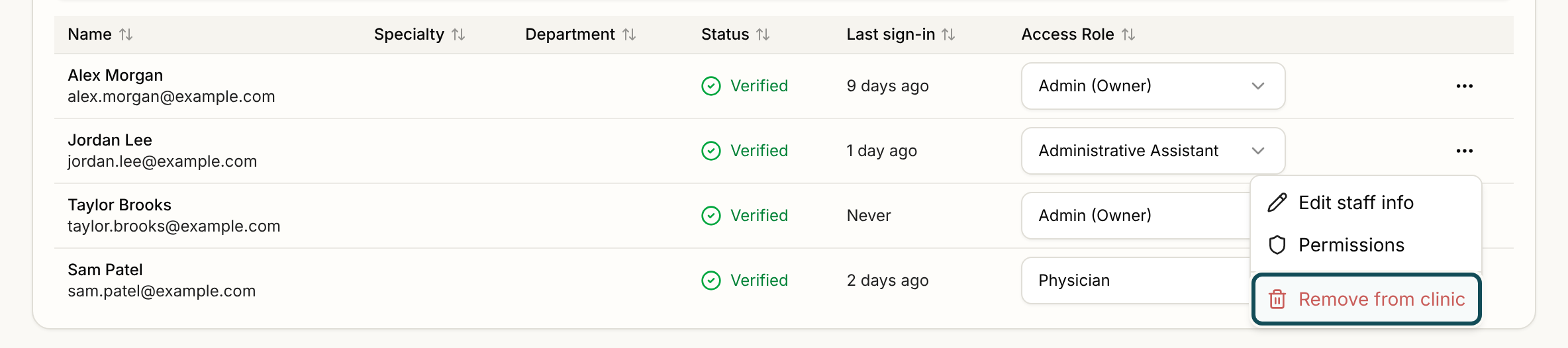
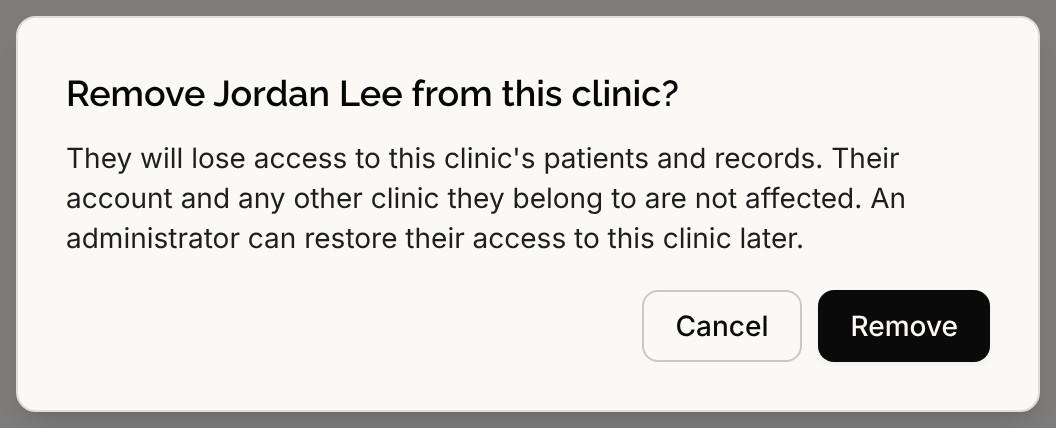
Serelora confirms with Staff member removed from this clinic. Your clinic's seat count updates, which can change what your Serelora subscription bills. See Your Serelora Subscription and Seats.
What removal does not do
- It does not delete the person's Serelora account, and it does not change their other clinics.
- It is not an account deactivation. Deactivating or reactivating a Serelora account is done by Serelora, not by a clinic administrator. If you need that, email support@serelora.com.
When Serelora refuses
- You can't remove your own access. Ask another administrator.
- This is the clinic's only administrator. Give someone else administrator access first. Give another person the Admin role first (see Roles and Permissions), then remove this one.
Bringing someone back
Adding a removed person again with Add Staff does not work. Serelora shows This person's access to the clinic was revoked by an administrator. A platform administrator must restore it. Email support@serelora.com and name the person and your clinic, and Serelora can restore their access.
A pending invitation is different. If someone you invited has not accepted yet and you no longer want them to join, ask Serelora to help. The staff list does not have a cancel action for invitations. An unaccepted invitation expires on the date shown under Pending invitations.