Documentation
Billing with the Chart Agent
You can bill from the chat instead of the Billing tab. Ask the chart agent for charges, an invoice, a payment or a payment link, and it prepares the change for you to review. Nothing is recorded until you approve it.
This feature is controlled by the Billing feature flag. If you do not see it in your clinic, contact Serelora at support@serelora.com and ask for it to be turned on.
Step 1: Open the patient's chart and ask
Open the patient from Patient List and use the agent on the left. The agent works on the chart that is open. See Chart Agent Overview.
You might type:
Add a 99213 and a lipid panel to today's visit, then show me what Jane Sample owes.
Charges and invoices go on the patient's current visit, the one that is underway. If no visit is underway, the agent tells you so. It does not create a visit.
If your catalog has the same code at different prices, the agent asks which one you mean instead of guessing.
Step 2: Review the card
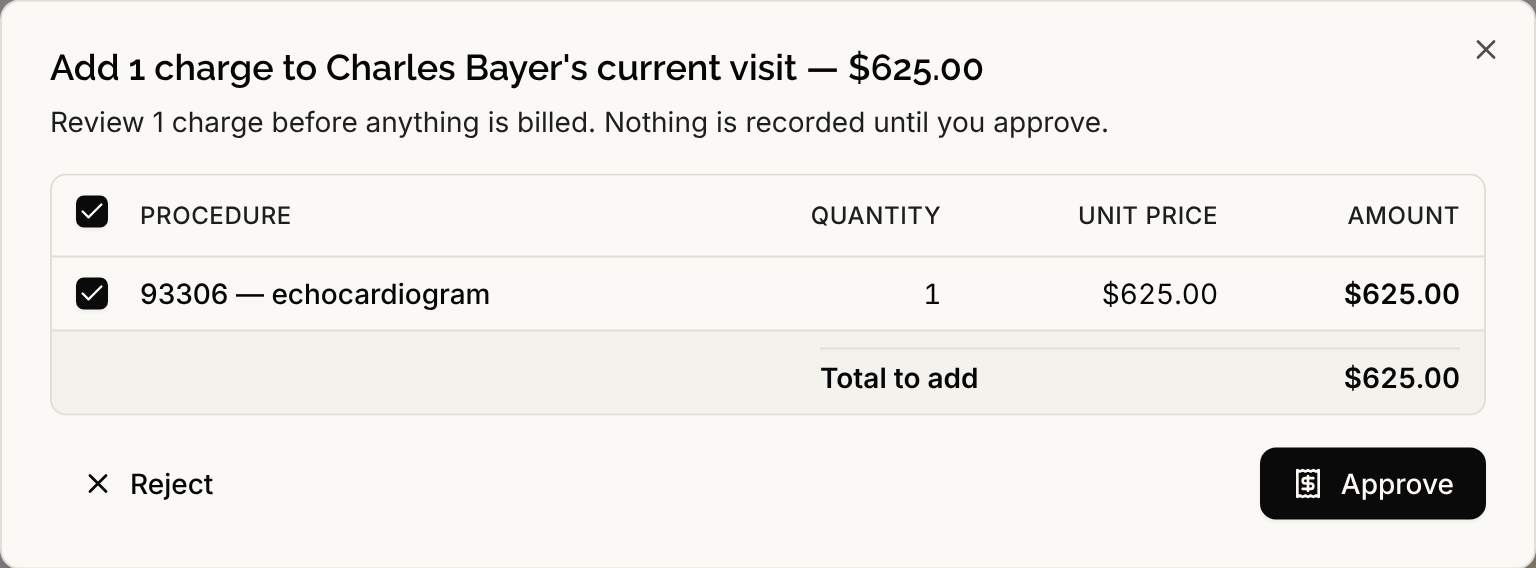
The agent replies that it prepared the change, never that it made it. A review dialog opens, and you can reopen it later from the chip in the chat. It says nothing is recorded until you approve.
- Charges: each line has a checkbox. All are ticked to start. Untick a line to leave it out, and the button changes to something like Approve 2 of 3.
- Invoice, payment or payment link: the card shows what will be issued, recorded or sent. A payment link shows the address it will go to, which is the patient's email on file. The agent cannot send it anywhere else.

Step 3: Approve or reject
Select Approve to save the change. It goes through the same billing screens you would use by hand, under your own account. Select Reject to decline it. Closing the dialog, pressing Escape or clicking outside only closes it, and the card stays pending.
When you approve, the chart opens the Billing tab on the Encounters sub-tab so you can see the result. The chip in the chat reads Billing updated. See Approval Cards.
If only some charge lines saved, the chip reads Partly billed and the dialog offers Approve remaining or Retry remaining. A rejected card reads Billing change rejected.
Ask a question instead
The agent can also read billing. Try "What does Jane Sample owe?" and it summarizes the visit or the whole account. Reading needs no approval.
What the agent can and cannot do
It can add charges, issue an invoice for a visit's charges, record a payment taken by hand, and email a payment link. These work like Adding Charges from a Visit, Invoices, Recording a Payment and Sending a Payment Link.
It cannot cancel an invoice, edit or remove a charge, apply a payment, or record an adjustment. Do those in the Billing tab.
Who can use it
The agent offers only what your role may do. By default Admins, Physicians, Office Managers and Administrative Assistants can ask for charges. Admins and Office Managers can also ask for invoices, payments and payment links. If you lose the permission after a card was prepared, the card still opens but has no Approve button.
Search documentation
Find a documentation page by the words on it.