Search documentation
Find a documentation page by the words on it.
Documentation
Attending Physicians
Every visit names one attending physician, the physician responsible for it. You choose the attending when you check a patient in or start a walk-in, and Serelora never guesses. This keeps the responsible physician on the record even when a physician assistant or medical assistant sees the patient.
This feature is controlled by the Encounters feature flag. If you do not see it in your clinic, contact Serelora at support@serelora.com and ask for it to be turned on.
Who can be the attending
Only a person whose role allows being named the attending physician appears in the Attending physician list. By default that is Admin and Physician. Admin is included so a physician who runs a solo practice under the Admin role can still attend their own visits. Your clinic can change which roles may attend.
If the list is empty or the person you expect is missing, check their role with your clinic administrator. The Check in and Start encounter buttons stay disabled until an attending is chosen.
Step 1: Choose the attending at check-in
In the Check in or Start encounter dialog, the Attending physician field is required.
- If you can be an attending, you are preselected.
- Otherwise, when you check in an appointment, its provider is preselected if they can attend.
- In every other case the field starts empty and you choose someone. See Checking a Patient In.
Step 2: Reassign the attending if it changes
- Open the Encounters tab in the patient's chart.
- Open the menu at the end of the visit's row and select Reassign attending….
- In Reassign attending physician, choose the physician under Select an attending physician.
- Select Reassign. The button stays disabled until you pick someone different from the current attending.
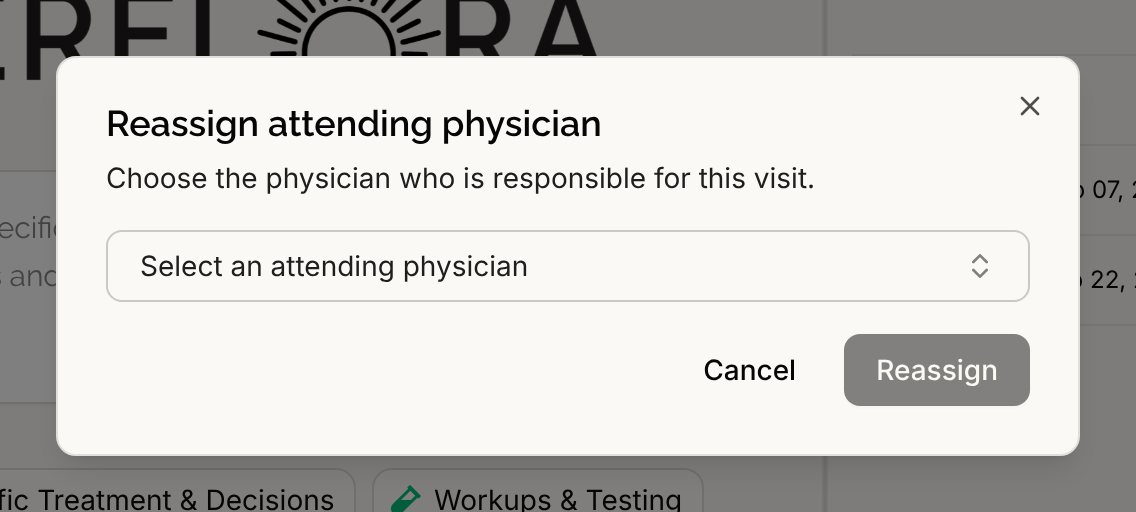
Reassigning is open to every standard role, and only on a visit that is still open. A finished or voided visit keeps its attending. If the physician you pick was recorded as a performer on that visit, they move up to attending and are no longer listed as a performer.
Seeing who else was involved
When the person who actually sees the patient is not the attending, for example a physician assistant whose booked slot is covered by a physician, that person is recorded as a performer on the visit. A front desk user who starts a walk-in on a physician's behalf is recorded as a participant too.
You can see the attending and the others in:
- The Attending section of the Current visit card, which lists other participants on one line beneath the attending.
- The Attending column of the Encounters tab.
- The walk-in card on the Calendar, which shows Attending: and each participant.
Why the attending matters for notes
Notes filed under a visit appear in the attending's My unsigned notes view on the Sign Notes worklist. When a note is submitted for review, the visit's attending is notified.