Search documentation
Find a documentation page by the words on it.
Documentation
Consent Alerts for Staff
Serelora keeps track of which consent forms each patient has accepted, and it shows staff where one is missing. A patient who has declined a form is treated differently from a patient who has not reached it yet. This page lists every place an alert appears and what to do about it.
Declined and not signed are different
- Not signed. The patient has not decided on the form yet, or the clinic has replaced the form with a new version that they have not decided on. On the Calendar and the Patient List this is amber.
- Declined by patient. The patient actively said no. On the Calendar and the Patient List this is red, and the patient's reason is shown where there is room for it, such as the chart notification.
A decision only counts for the form's current version. If an Admin replaces a form, patients must decide again.
On the patient's chart
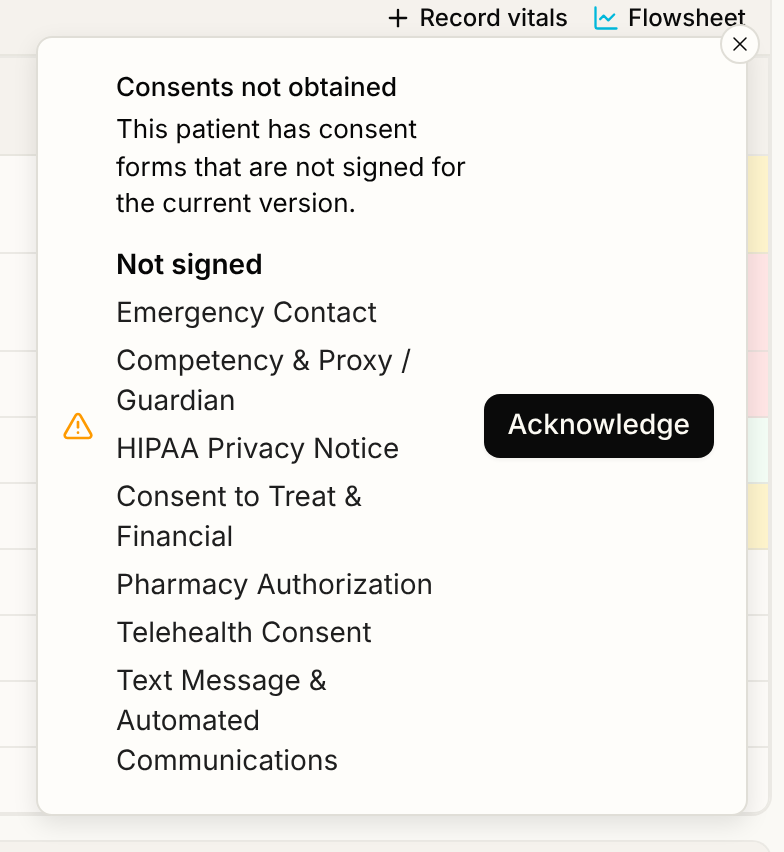
- A notification when you open the chart. The first time you open the chart of a patient with a declined or unsigned form, a notification titled Consents not obtained appears at the bottom right. It says "This patient has consent forms that are not signed for the current version." and lists the forms under Declined by patient and Not signed. It stays on screen until you select Acknowledge or close it. It never blocks the chart. After you acknowledge, it stays quiet for that patient for the rest of your browser session. Serelora records that you were shown it.
- If it cannot check. If the status cannot be loaded, the notification reads Consent status unavailable. That is not the same as no problem. Open the chart again.
- The Consents section. On the Summary tab, each form shows Not signed, Declined by patient, or when and how it was decided. A form decided on an older version also shows Newer version unsigned. This is where you can record a decision made on paper or by phone. See Recording Patient Consent.
On the Patient List
The Alerts column shows a red Consents declined tag or an amber Consents outstanding tag, beside any free-text alert saved on the record. It answers one question: does this patient have unmet consents at this clinic. See Patient List and Search.
On the Calendar
An appointment for a patient with unmet forms shows a small icon, red for a decline and amber otherwise, on upcoming visits. In the appointment card, a line tells you the patient declined consent and to discuss it before treatment, or reads "Consent forms outstanding for this visit". See The Calendar.
If the consent status cannot be worked out, the Calendar loads without the icons. A missing icon is not proof that the forms are signed.
What a declined form does not do
A declined form is an alert, not a lock. Serelora does not block booking, check-in, starting or finishing a visit, writing a note, or taking payment because a form is declined or unsigned. The decision about how to proceed stays with your team.
The one thing a decline does change is texting. If a patient declines the Text Message & Automated Communications form, Serelora stops sending them texts. See Opt-Outs and Consent for Texts.
How patients get their forms
Patients decide on forms in the portal, during intake and at check-in, and later from Consents. See Intake Forms and Consents and Pre-Visit Check-In. Admins manage the forms themselves. See Consent Forms.