Search documentation
Find a documentation page by the words on it.
Documentation
Appointment Reminders
When appointment reminders are turned on for your clinic, Serelora messages patients about their appointments by text and by email. There is nothing to send by hand. Messages follow what you do on the Calendar.
This feature is controlled by the Appointment notifications feature flag. If you do not see it in your clinic, contact Serelora at support@serelora.com and ask for it to be turned on.
What patients receive
| Message | When it is sent |
|---|---|
| Booking confirmation | Right after the appointment is booked, however far ahead it is. |
| Check-in is open | 10:00 AM clinic time, 7 days before the appointment. It links to the patient's pre-visit check-in. |
| Reminder | 10:00 AM, 2 days before. For a patient who has not finished check-in it nudges them to. |
| Day-before reminder | 10:00 AM, 1 day before. It gives the time and location and what to bring, such as a photo ID, insurance card and medication list. A telehealth visit says so. |
| Moved | Right away when the appointment's start time changes. |
| Cancelled | Right away when the appointment is cancelled. |
| Back on the schedule | Right away when a cancelled or closed-out appointment is set back to Booked or Pending. It tells the patient to disregard the earlier cancellation. |
A patient who has already completed their pre-visit check-in gets an "all set" version of each reminder instead of a nudge, so they are not asked twice. Completed check-in stays completed if the appointment is moved.
Texts go to the phone number on the patient's record, and emails to their email address. A patient without a phone number gets no text, and a placeholder email address gets no email.
Which appointments get messages
Only Booked and Pending appointments are treated as bookings the patient should hear about. Proposed, Waitlist and Arrived appointments send nothing. When a Proposed or Waitlist appointment is moved to Booked or Pending, the booking confirmation is the patient's first message about it. A no-show or an appointment entered in error sends nothing. Once an appointment is closed out, any reminder still waiting to go is skipped. See Appointment Statuses.
Reminders are planned when an appointment is booked or rescheduled. An appointment booked before reminders were turned on for your clinic may not have any until it is rescheduled.
When a patient does not want messages
Patients can switch appointment messages off for text, email or both from their own settings. Staff can do the same on the patient's behalf, for example when a patient asks at the front desk to stop the texts.
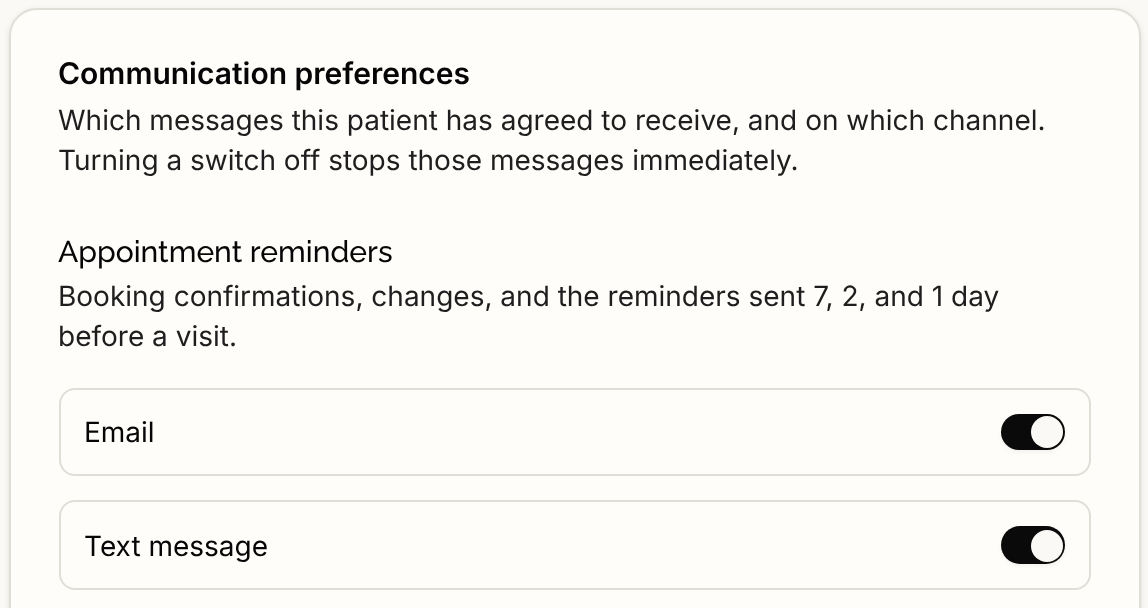
- Open the patient's record editor and select the Communication section.
- Under Appointment reminders, turn off Email, Text message, or both.
- Select Save preferences.
A patient with no saved choice counts as opted in. If a patient replied STOP to a text, their carrier blocks texts to that number and Serelora is not told, so turning the switch back on does not undo it. The patient has to reply START from that phone.