Search documentation
Find a documentation page by the words on it.
Documentation
The Summary Tab
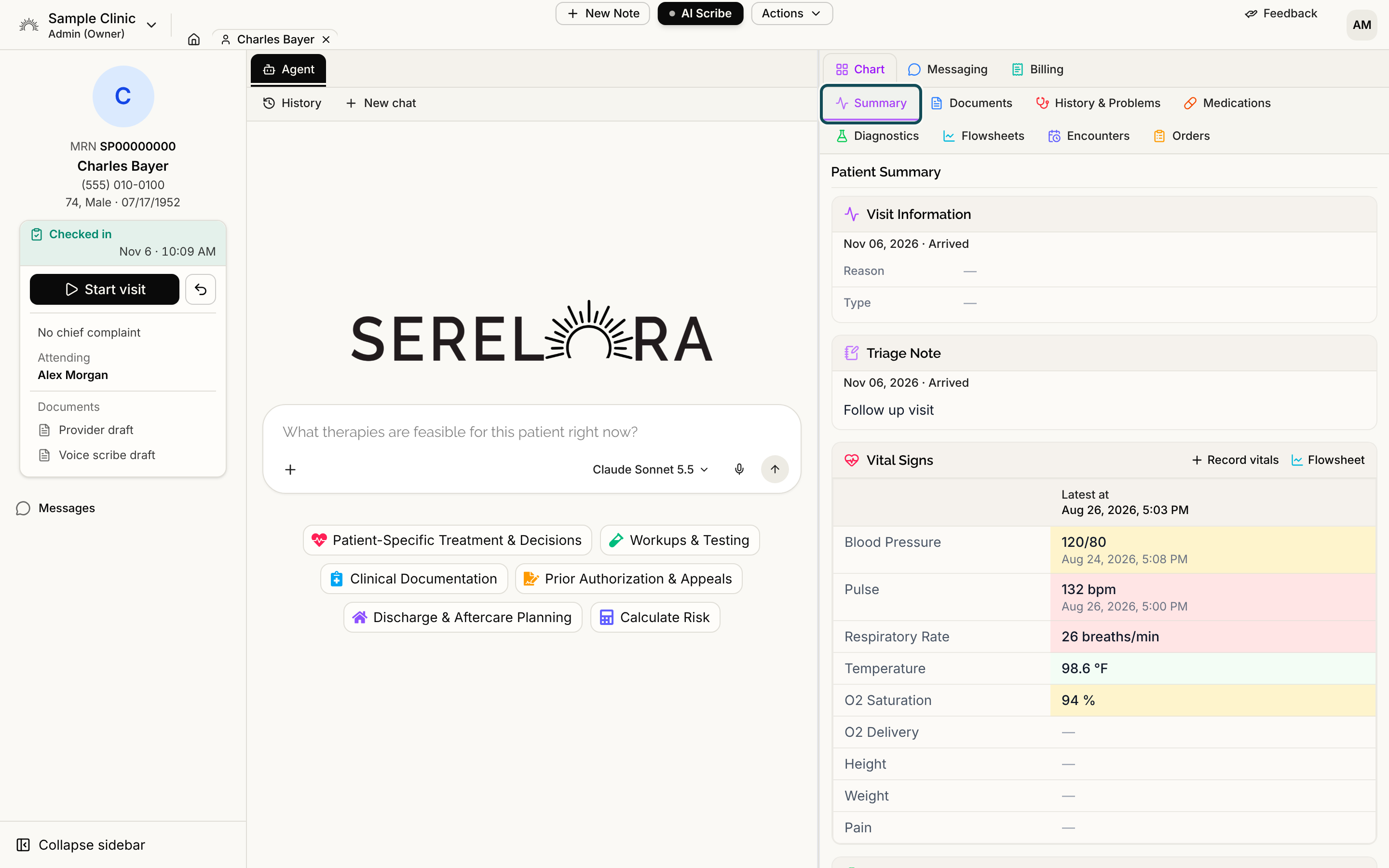
The Summary tab is the first thing you see when a chart opens. It is a grid of short cards, each showing the most relevant rows for one part of the chart, with a link to the full list.
The cards
Cards appear in this order:
- Visit Information and Triage Note, only if your clinic has Encounters turned on. These sit side by side at the top and show the current visit's details and a triage note you can edit.
- Vital Signs
- Labs (Most Recent)
- Problem List
- Medications
- Medical History
- Surgical History
- Allergies
- Consents
- Immunizations
The grid has one, two or three columns depending on how wide the pane is. If you open the Agent beside the chart, the cards reflow to fit.
See the full list
Most cards show up to eight rows. When a card is cut short, its footer says so, for example Showing 8 of 23, and a View all link opens the full list in the tab that owns it: Diagnostics for labs, History & Problems for problems, medical history and surgical history, and Medications for medications.
Two cards show only part of their list even before the row limit. The Medications card shows only active medications, and the Surgical History card shows only procedures marked as surgical. Open View all to see the rest.
Allergies and Immunizations have no tab of their own, so those two cards always show every row.
Select any row to open its claim detail. See Claim Detail and Where a Fact Came From.
Vital Signs
The card lists the latest reading of each vital. The column header reads Latest at and the newest time. A vital that was taken at a different time shows its own time under its value. A value outside the usual adult range is tinted, and screen readers hear that it is outside the reference range. A vital with no reading is shown as a dash and is not tinted.
Two shortcuts sit in the card header:
- Flowsheet opens the Flowsheets tab so you can read vitals over time.
- Record vitals opens the form for entering a set of readings. It appears only if you can edit the chart or record vitals.
Select a vital's name to see its history and an Add measurement form. See Vitals and Flowsheets.
Allergies and Immunizations
The Allergies card shows each allergen and its reaction. The Status, onset date and code are on the claim detail that opens when you select a row. The Immunizations card shows each vaccine and the date it was given. See Immunizations.
Reviewed and updated labels
Some cards show a small line in the header, either Reviewed with a date, time and name, or Updated with a date and time. See Last Reviewed.
Consents
The Consents card shows the status of each consent form. If your role can record consents, each form has a Record button for entering a decision the patient made on paper or by voice.
Entered in error
A condition or procedure that someone marked as entered in error is hidden from the Problem List, Medical History and Surgical History cards. It is still reachable through View all and History & Problems. See Correcting a Claim.
See also
- Medications, the full list behind the Medications card.
- Allergies, where allergies come from and how to correct them.
- Surgical History and Procedures, behind the Surgical History card.
- Recording Patient Consent, for the Consents card.
- Visit Information and Triage Note, for the two cards at the top when your clinic uses visits.