Search documentation
Find a documentation page by the words on it.
Documentation
Labs and Diagnostics
The Diagnostics tab holds a patient's test results. Results come from documents you upload and from health record files, and each one links back to its source.
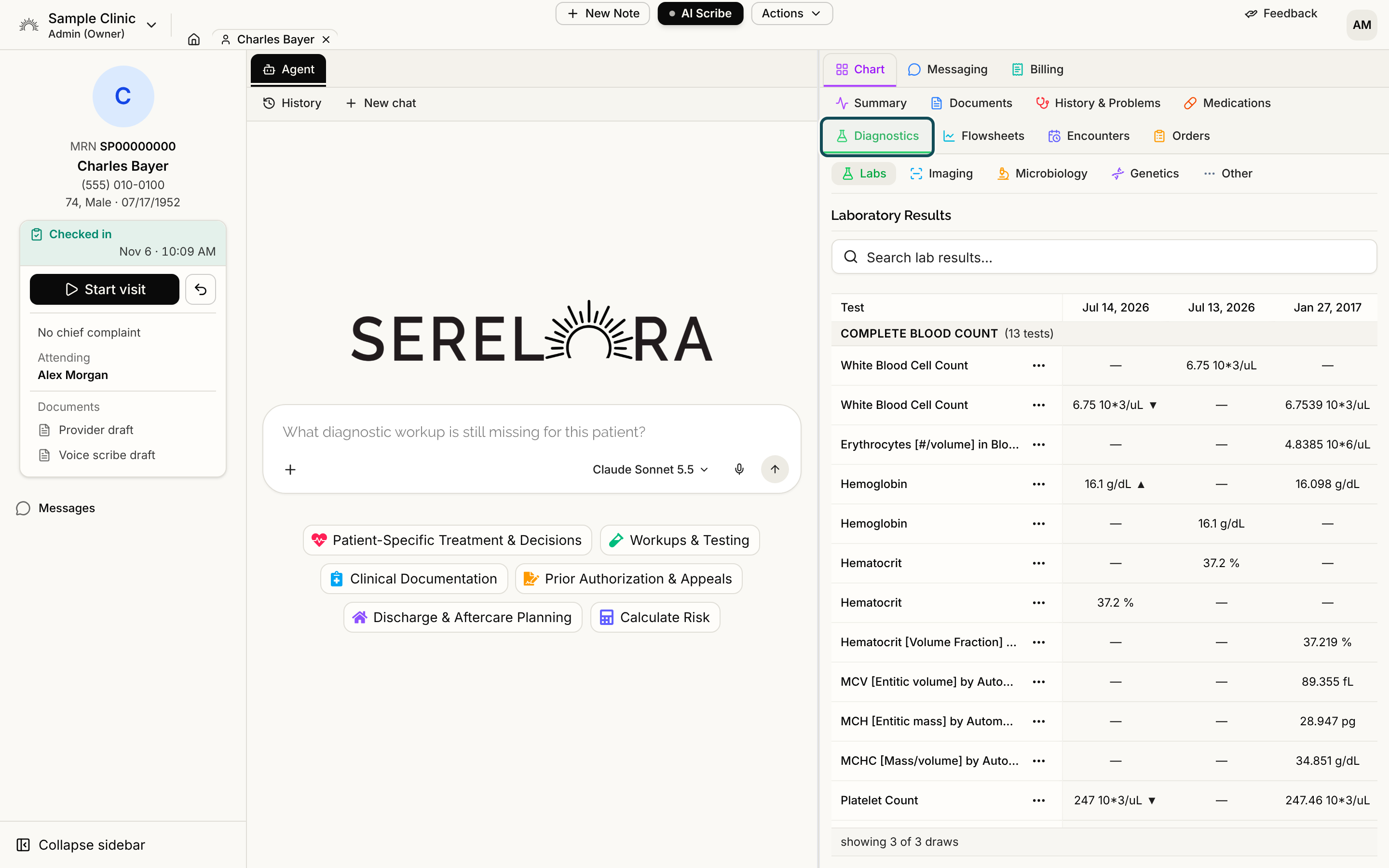
The sub-tabs
- Labs is a grid of lab results over time.
- Imaging lists imaging reports. See Imaging.
- Microbiology lists cultures.
- Genetics lists genetic findings.
- Other lists test results that are not labs, such as other measurements. Its table has Observation, Status, Value, Date and Last Confirmed columns, and its status pills work like the ones on History and Problems.
Step 1: Read the Labs grid
Each row is one test. Tests are grouped under a header for the panel they belong to, such as a metabolic panel, and the header says how many tests it holds, for example (14 tests). Each column is one draw date, with the newest first.
The footer says how many draws are shown, for example showing 6 of 20 draws. Select Load older to add more. Use the Search lab results… box to find a test, a panel or a value.
A column headed Date not stated means the source gave no collection date. Hover the header to see which date Serelora used from the document instead.
Step 2: Read the arrows
When a result and the previous result of the same test are both numbers with the same unit, the newer cell shows an arrow: a triangle pointing up if the value went up, or down if it went down. The arrow shows only the direction of change.
The grid does not compare a result with a reference range. It never marks a result as high, low or abnormal and never colors it. Read the value and the unit and apply clinical judgment. If the report printed a reference range or a flag, it is kept with the result and shown, as the report stated it, in the result's claim detail under Result detail. See Source Details on a Claim.
Step 3: Open a result
Select a result to open its claim detail, where you can see the document it came from and the passage it was read from. See Claim Detail and Where a Fact Came From. A test name also has a row menu for confirming or correcting the entry, for roles that can edit the chart. See Correcting a Claim.
Microbiology
The table has Specimen, Collected and Organism columns, with one row for each organism found. Expand a row to see the antibiotics tested and the result for each one.
Genetics
Each row is one reported finding, with Gene, Variant, Zygosity, Significance and Reported columns, grouped by the test it came from.
The Summary card
The Summary tab's Labs (Most Recent) card shows the newest result for each test. Its View all link opens this grid.
See also
- Microbiology, Genetics and Other Results covers the susceptibility panel, the genetics columns and the Other sub-tab in detail.
- Source Details on a Claim shows a result's reference range and interpretation when the report printed them.