Documentation
Practice Reports from a Cohort
A practice report is a PDF about a group of patients, not one person. You find the group, ask the Practice Agent to count and break it down, and then ask for the report. It is useful when you need to hand someone a summary of a part of your panel, such as everyone with diabetes and no recent A1c.
This feature is controlled by the Practice Agent feature flag. If you do not see it in your clinic, contact Serelora at support@serelora.com and ask for it to be turned on.
Step 1: Find the group
Open Practice Agent in the sidebar and ask for the group. See Practice Agent Question Types.
Patients with diabetes and no A1c in the last 12 months
The result opens as a cohort tab. Save it if you will want it again. See Managing Saved Cohorts.
Step 2: Ask for the breakdowns you want
Ask for the cuts that answer your question. The agent counts them without listing patients.
Break down this cohort by age and sex.
You can group by age band, by sex, by which filter matched, by time since the last visit, and by registration status. Ask for more than one if you need them.
Step 3: Ask for the report
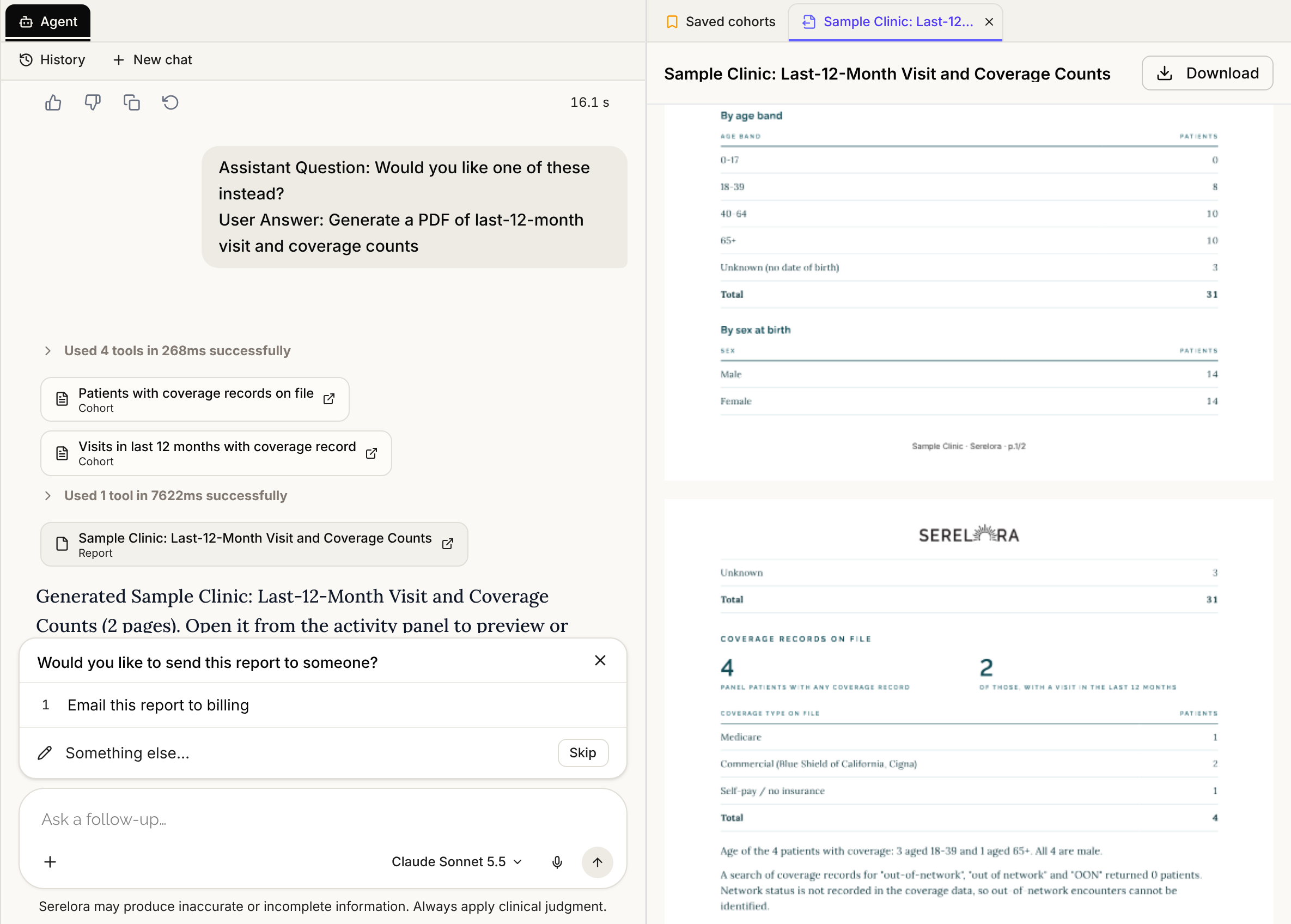
Make me a PDF summary of this cohort.
Break down this cohort by age and sex, then put it in a PDF report.
The agent builds the report from the counts and breakdowns it has already retrieved in this chat. It does not invent figures. If you ask for a number it has not counted, it counts it first or tells you it cannot.
The PDF opens in a report tab on the right. The footer shows your clinic's name and the page number. It carries the Serelora look, not your clinic's logo.
Step 4: Check it against the cohort
A report cannot be edited by hand. Check each figure against the cohort tab before you share it. To change something, say what to change in the chat and the agent builds a new report in its own tab.
Put the age breakdown first and make it one page.
Step 5: Download or email it
Select Download in the report tab, or ask the agent to email it.
Email this report to ops@example.com.
The agent prepares an email with the report attached and you send it from the card. See Sending a Report. Downloading or emailing a practice report needs the export permission, which is Admin only by default.
What a practice report is not
- It is not saved to a chart. A practice report belongs to no patient, so there is no Save to chart. See Saving a Report to the Chart.
- It is not a patient list. For the people in the group, export the cohort. See Managing Saved Cohorts.
- It is not shared automatically. A report is private to the person who created it until they download or email it.
- It does not replace your own check. Cohorts depend on what is recorded in the charts, including any entries that are missing or undated.
Who can do this
The Practice Agent is Admin only by default, so practice reports are too. A clinic admin can give the Practice Agent and the export permission to other roles. See Custom Roles and Per-User Permissions.
Related guides
For direct primary care practices, see Employer Reporting for DPCs and Patient Wellness Reporting. To read about reports in general, see Reports Overview.
Search documentation
Find a documentation page by the words on it.