Search documentation
Find a documentation page by the words on it.
Documentation
Blocking Time on the Calendar
A block marks time on the Calendar that is not for patients, such as lunch or a staff meeting. Blocks name no patient, and they appear behind the appointments in the providers' columns.
Step 1: Start a new entry
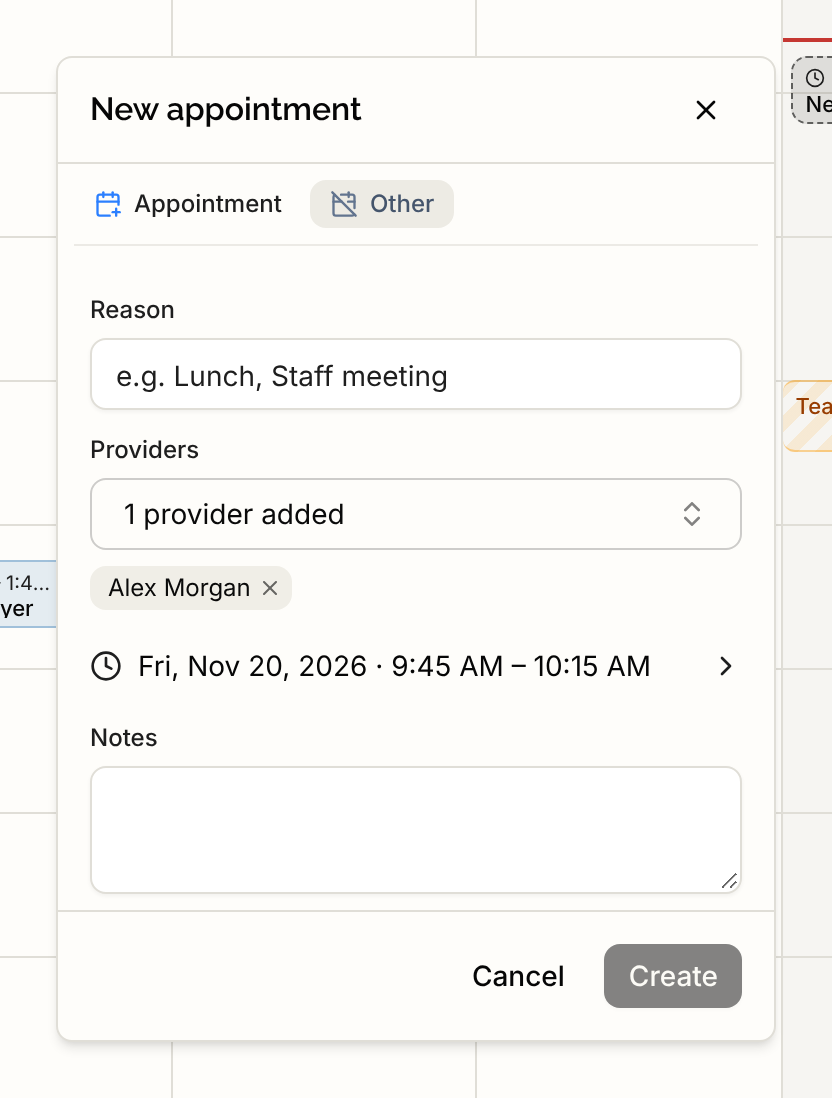
Open the Calendar and select an open time, or press Create. In the New appointment card, select the Other tab, next to Appointment.
Step 2: Fill in the block
- Reason. A short label, for example "Lunch" or "Staff meeting".
- Providers. The providers whose calendars are blocked. You are added by default. The picker offers Select all to add every provider at once, and Deselect all to clear them. A block can have up to 10 providers.
- Date and time. Select the line to change the date, Start and End.
- Repeat. Choose Does not repeat, Daily, a weekly option for the weekday you picked, Every weekday or Custom…. With Custom… you pick every day or week and, for weekly, which days. When something repeats, Ends lets you choose Never or On a date.
- Notes. Optional.
Step 3: Select Create
A message reads Block created, and the block appears as a band on the Calendar.
Editing or removing a block
Select the band to open its card. It reads "Blocked time on the calendar, not tied to a patient."
- Edit lets you change the fields. For a repeating block, an edit always applies to the whole series.
- Delete asks Remove this block? For a one-time block that is all. For a repeating block you choose This event, This and following events or All events, then select Remove.
Limits to know about
- A block is a marker on the Calendar. It does not stop anyone from booking an appointment over it.
- Blocks do not remove times from patient self-booking or from the chart agent's scheduling.
- Blocks cannot be dragged or resized. Use Edit.
- A block that runs past midnight is drawn only on the day it starts.
- Two overlapping blocks, or a block and an appointment, can sit on the same time with no warning.
All six standard roles can create, edit and remove blocks.