Search documentation
Find a documentation page by the words on it.
Documentation
Balances at Check-In and on the Calendar
The front desk is the easiest place to collect what a patient owes. Serelora shows the balance on the Calendar and again in the Check in dialog, so you can ask for payment while the patient is standing there.
This feature is controlled by the Billing feature flag. If you do not see it in your clinic, contact Serelora at support@serelora.com and ask for it to be turned on.
Step 1: Spot a balance on the Calendar
Open Calendar. An appointment whose patient owes money at your clinic shows a small red amount beside the time on its block. A patient who is in credit shows the amount in a muted colour, followed by CR. When there is nothing to collect, the block shows no amount at all.
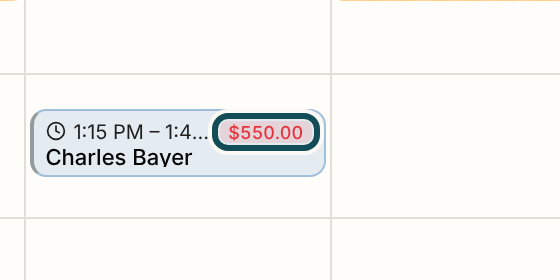
The amount is the patient's total across every open invoice at your clinic, not only the visit on the block. It also shows on past and cancelled appointments, because the money is still owed. A walk-in block shows "Walk-in" instead of a balance.
Anyone who can read billing, which is every role by default, sees the badge when your clinic has billing turned on. If the balance cannot be worked out, the Calendar still loads and simply shows no badge.
Step 2: Open the Check in dialog
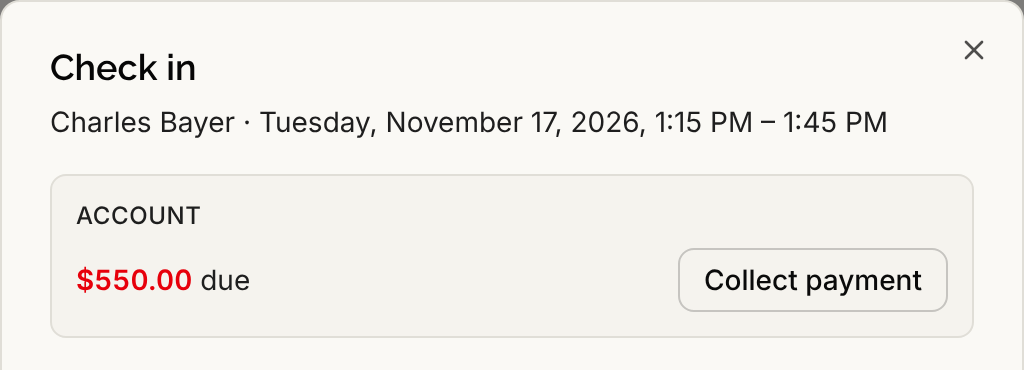
Select the appointment, then select Check in in the card that opens. See Checking a Patient In. When billing is on, an Account panel appears near the top of the dialog. It says one of these:
- Checking balance… while it loads.
- An amount followed by "due", and "across 2 invoices" or more when several are open.
- An amount followed by "patient is in credit".
- No balance due when the account is settled.
- Balance unavailable right now. when billing could not be read. Check-in is not affected, so you can carry on.
Step 3: Collect payment
If your role can record payments, a button sits beside the amount. It reads Collect payment when the patient has an open invoice, and Take payment when there is none. Select it to open the payment dialog, enter how the patient paid and the amount, and record it. The steps are in Recording a Payment.
When the patient has several open invoices, the payment goes against the oldest one. When there is no open invoice, the panel adds a short note that a payment taken now is held as an unapplied credit. Apply that credit once an invoice exists, see Applying Payments to Invoices.
Who can do this
Anyone who can read billing sees the balance. By default that is every role. Collecting a payment needs the permission to record payments, which Admins and Office Managers have by default. Without it the panel shows the balance and no button. Checking someone in does not need any billing permission.